TAMRON TAP-in Console for Canon
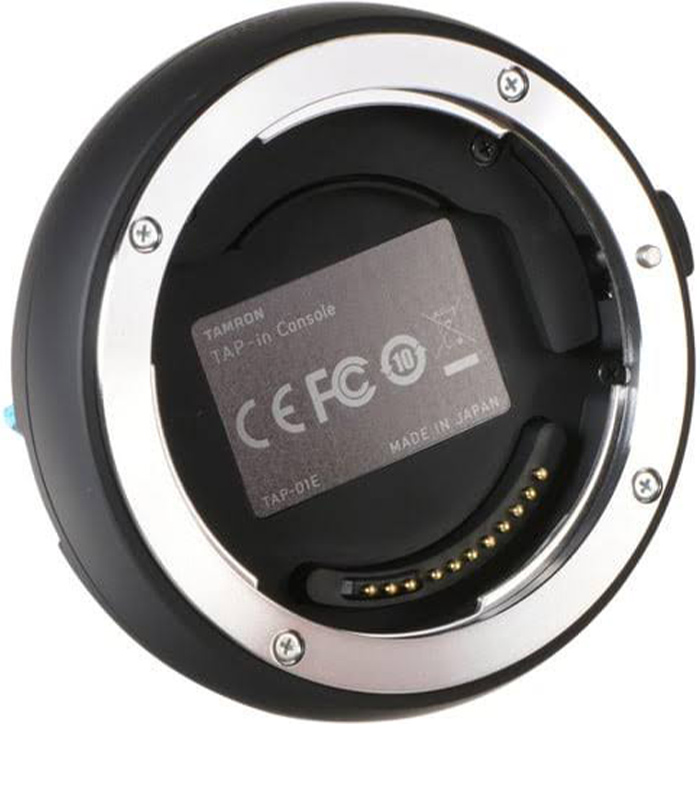
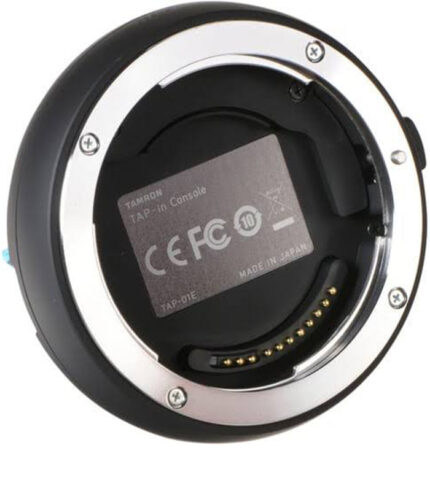
The Tamron TAP-in Console for Canon is a practical lens customization and firmware management accessory designed for select Tamron Canon EF-mount lenses. It provides photographers with a convenient way to connect compatible Tamron lenses directly to a computer and use the TAP-in Utility software to update lens firmware and fine-tune selected lens settings.
For photographers, videographers, studios, and professional users who depend on accurate lens performance, keeping compatible lenses updated and properly configured can be important. The TAP-in Console provides a dedicated interface for managing supported Tamron lenses without requiring the lens to be sent away for routine firmware updates or compatible adjustments.
Key Features of the Tamron TAP-in Console for Canon
- Designed for select Tamron Canon EF-mount lenses
- Supports lens firmware updates
- Compatible with the TAP-in Utility application
- Works with Mac and PC computers
- Allows adjustment of selected compatible lens settings
- Provides a convenient computer-based lens configuration solution
- Designed specifically for compatible Tamron lenses
- Useful for photographers who want greater control over supported lens functions
- Compact and practical accessory for camera equipment maintenance
Update Tamron Lens Firmware Easily
One of the main functions of the Tamron TAP-in Console for Canon is its ability to update the firmware of compatible Tamron lenses. Firmware updates can introduce improvements, enhance compatibility, and address performance-related issues identified by the manufacturer.
Instead of relying on a camera body to perform lens firmware management, the TAP-in Console provides a dedicated connection between the compatible Tamron lens and a computer. Users can connect the lens to the console and access the TAP-in Utility application to check and apply available firmware updates.
Keeping supported lenses updated can be particularly useful for photographers using newer camera bodies or maintaining equipment for professional photography assignments.
Customize Compatible Lens Settings
Beyond firmware updates, the TAP-in Console can provide access to selected customization options on supported Tamron lenses. Depending on the specific lens model, users can adjust certain settings through the TAP-in Utility application.
This makes the console useful for photographers who want to fine-tune their equipment according to their shooting requirements. Configuration options vary depending on the lens, so users should confirm compatibility and available functions for their specific Tamron model before purchasing.
TAP-in Utility for Mac and PC
The TAP-in Utility is the computer application used with the Tamron TAP-in Console. The software provides the interface through which users can update firmware and configure supported lens functions.
The console is designed for use with compatible Mac and Windows PC systems, making it suitable for photographers working across different computer platforms.
The computer-based approach also provides a convenient way to maintain compatible Tamron lenses as part of a regular photography equipment maintenance routine.
Designed for Select Tamron Canon EF-Mount Lenses
The Tamron TAP-in Console for Canon is not a universal adapter for every Canon or Tamron lens. It is specifically designed for select Tamron lenses with Canon EF mounts that support TAP-in Console functionality.
Before purchasing, it is important to confirm that your exact Tamron lens model is compatible with the console and that the desired customization functions are supported.
This compatibility-focused design helps ensure that photographers can access the appropriate firmware and configuration options for supported lenses.
A Useful Accessory for Professional Photographers
Photographers who use multiple Tamron lenses can benefit from having a dedicated lens management accessory available. The TAP-in Console can help simplify firmware maintenance and selected lens configuration tasks from a computer.
For professional photographers, studios, content creators, and photography enthusiasts, maintaining camera equipment properly can contribute to a smoother workflow. Having access to firmware updates and supported customization options can also make it easier to keep compatible lenses current.
Practical Lens Maintenance Solution
The Tamron TAP-in Console for Canon is a specialized accessory rather than a conventional camera adapter. Its primary purpose is to provide access to supported lens firmware and customization functions.
Its compact design makes it practical to keep alongside other photography accessories. When an update or adjustment is required, users can connect a compatible Tamron Canon EF-mount lens to the console and use the TAP-in Utility application on a compatible computer.
Important Compatibility Information
Because functionality depends on the lens model, users should verify compatibility before ordering. The console is intended for select Tamron Canon EF-mount lenses that support TAP-in Console functionality.
Firmware availability and customization options can also vary between lens models. Always use the appropriate TAP-in Utility software and follow Tamron’s instructions when performing firmware updates or changing lens settings.
Why Choose the Tamron TAP-in Console for Canon?
The TAP-in Console provides a dedicated way to manage supported Tamron Canon EF-mount lenses from a computer. It combines firmware management and selected lens customization functions into one practical accessory.
For users who want to maintain compatible Tamron lenses, the console can be a valuable addition to a professional or enthusiast photography setup. It is particularly useful when regular firmware maintenance and lens configuration are part of an equipment management workflow.
Whether you are a professional photographer, studio operator, videographer, or photography enthusiast, the Tamron TAP-in Console for Canon provides a convenient computer-based solution for managing supported Tamron lenses.
Buy Tamron TAP-in Console for Canon in Kenya
Looking for the Tamron TAP-in Console for Canon in Kenya? Neriahtech Computers supplies photography equipment, camera accessories, lenses, computers, networking products, and other technology solutions.
For availability, pricing, and ordering information, contact Neriahtech Computers on +254 113 81 81 82 or email neriahtechcomputers@gmail.com.
You can also connect with Neriahtech Computers through:
For more photography equipment and technology products, visit Neriahtech Computers.
Product Specifications
Product Type: Tamron TAP-in Console for Canon
Compatibility: Select Tamron Canon EF-mount lenses
Primary Function: Lens firmware updates and selected lens setting adjustments
Software: Tamron TAP-in Utility
Computer Compatibility: Mac and PC
Connection: Dedicated TAP-in Console interface
Application: Lens firmware management and customization
Summary
The Tamron TAP-in Console for Canon is a dedicated lens management accessory for photographers using compatible Tamron Canon EF-mount lenses. Through the TAP-in Utility application on Mac or PC, users can update supported lens firmware and adjust selected lens settings.
It offers a convenient way to maintain compatible Tamron lenses and access supported customization features directly from a computer. Before purchase, confirm that your particular Tamron lens supports the TAP-in Console and the functions you require.
Contact Neriahtech Computers: +254 113 81 81 82
Email: neriahtechcomputers@gmail.com


 Pick up from the Woodmart Store
 Courier delivery
 DHL Courier delivery
 Overview




Reviews
There are no reviews yet.