Logitech MX Master 3S Wireless Mouse (Graphite)
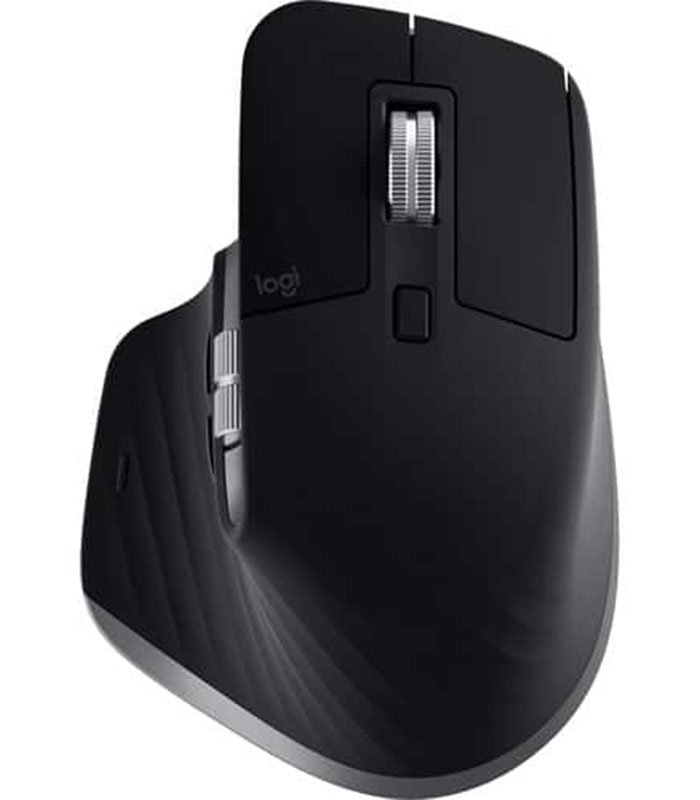
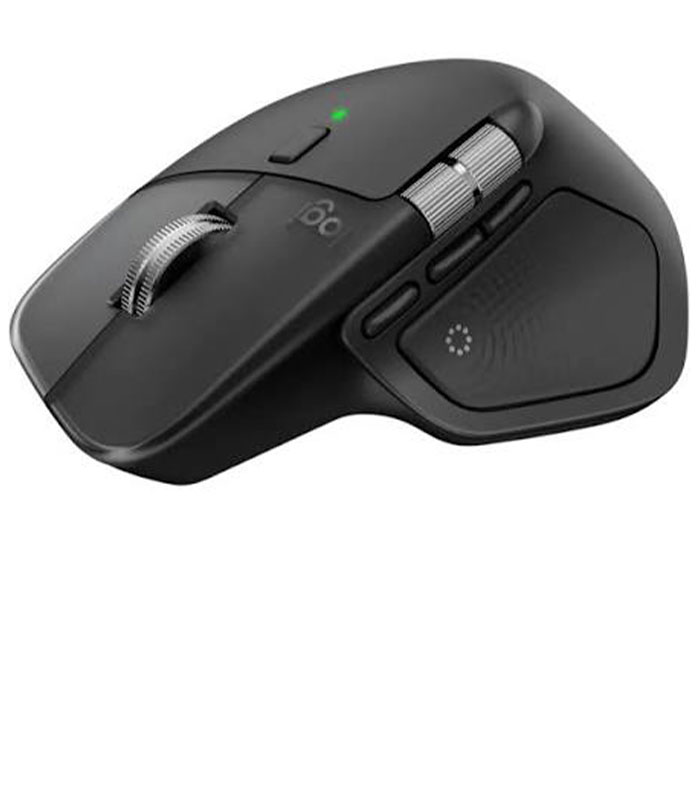
The Logitech MX Master 3S Wireless Mouse in Graphite is a premium productivity mouse designed for professionals, creators, business users, and anyone who spends long hours working on a computer. It combines an ergonomic right-handed design with advanced tracking, quiet operation, fast scrolling, customizable controls, and reliable wireless connectivity. Whether you are working with spreadsheets, designing graphics, editing videos, programming, browsing the web, or managing multiple applications, the MX Master 3S provides the precision and flexibility needed for demanding everyday tasks.
With its 8000 DPI Darkfield high-precision sensor, the mouse delivers accurate tracking across a wide range of surfaces, including high-resolution displays and compatible glass surfaces. Logitech also equips the MX Master 3S with its MagSpeed electromagnetic scroll wheel, allowing smooth, fast scrolling as well as precise line-by-line navigation.
Key Features of the Logitech MX Master 3S
- 8000 DPI Darkfield high-precision tracking
- Quiet Click technology for significantly reduced clicking noise
- MagSpeed electromagnetic scrolling wheel
- Ergonomic right-handed design
- 7 customizable buttons
- Thumb wheel for horizontal scrolling
- Back and forward navigation buttons
- USB-C rechargeable battery
- Up to 70 days of battery life on a full charge
- Fast charging capability
- Logi Bolt USB receiver connectivity
- Bluetooth Low Energy wireless connectivity
- Easy-Switch support for up to 3 computers
- Logi Options+ software customization
- Graphite finish
- Wireless range of up to 10 metres
Precision Tracking with an 8000 DPI Sensor
The MX Master 3S is built for users who need dependable cursor control. Its Darkfield high-precision sensor supports adjustable tracking from 200 DPI up to 8000 DPI, with adjustments available in 50 DPI increments through compatible software. This makes it possible to fine-tune cursor sensitivity according to your workflow and display setup.
The high-resolution tracking is particularly useful for designers, video editors, developers, and professionals working with large or multiple monitors. You can move around detailed interfaces with greater control without constantly repositioning the mouse.
Track on More Surfaces
The Darkfield tracking technology is designed to work across a variety of surfaces and can even track on glass with a minimum thickness of 4 mm under supported conditions. This gives users more flexibility when setting up their workstation.
Quiet Click Technology for a More Focused Workspace
One of the standout improvements of the MX Master 3S is its Quiet Click technology. Logitech states that the technology reduces click noise by approximately 90% compared with the MX Master 3.
The quieter operation makes the mouse suitable for offices, home workstations, shared workspaces, libraries, and other environments where excessive clicking can become distracting. You still receive a satisfying tactile response while creating less audible noise.
MagSpeed Scrolling for Fast and Precise Navigation
The MagSpeed scroll wheel gives the Logitech MX Master 3S two useful scrolling experiences. You can use precise ratchet-style scrolling when working through documents or switch to free-spinning scrolling when moving rapidly through long webpages, spreadsheets, or large files.
Logitech specifies scrolling speeds of up to approximately 1,000 lines per second, making the mouse particularly useful for users who regularly navigate lengthy documents, large spreadsheets, timelines, and websites.
Convenient Thumb Wheel and Navigation Buttons
The MX Master 3S includes a dedicated thumb wheel for horizontal scrolling. It can be especially useful when working with wide spreadsheets, timelines, design applications, and large documents.
The back and forward buttons also make everyday navigation faster by allowing quick movement between webpages, folders, and application screens. With Logi Options+ software, supported controls can be customized for different applications and workflows.
Comfortable Ergonomic Design
Designed specifically for right-handed use, the Logitech MX Master 3S has a sculpted shape that supports the hand during extended computer sessions. Its ergonomic form helps provide a comfortable grip while the thumb area places important controls within easy reach.
The mouse measures approximately 124.9 mm in height, 84.3 mm in width, and 51 mm in depth, with a product weight of approximately 141 grams.
This makes it a strong choice for professional desks where comfort, control, and productivity are priorities.
Connect to Up to Three Computers
The Logitech MX Master 3S supports convenient multi-device workflows. Using Easy-Switch, users can switch between up to three compatible computers, making it practical for people who work across multiple systems.
You can connect using Bluetooth Low Energy or the compatible Logi Bolt USB receiver, depending on your computer and preferred setup. The wireless operating range is rated at up to 10 metres, although actual range can vary depending on the environment and computer configuration.
USB-C Rechargeable Battery
The MX Master 3S features a 500 mAh rechargeable Li-Po battery and charges through USB-C. Logitech rates the battery for up to 70 days on a full charge, although actual battery performance depends on usage and operating conditions.
A quick charge can also provide substantial additional working time, helping reduce interruptions when the battery is running low.
Customize Your Workflow with Logi Options+
The mouse works with Logi Options+ on Windows and macOS, allowing users to customize supported buttons and controls for their preferred workflow. Application-specific settings can make the MX Master 3S particularly useful for professional software and productivity applications.
For example, different button functions can be configured according to the application being used, helping reduce repetitive actions and keeping frequently used commands within easy reach.
Who Should Buy the Logitech MX Master 3S?
The Logitech MX Master 3S is an excellent choice for:
- Office and business professionals
- Graphic designers and creative professionals
- Video editors
- Software developers and programmers
- Students and researchers
- Content creators
- Professionals using multiple monitors
- Spreadsheet-heavy users
- Remote workers and home-office users
- Anyone looking for a premium ergonomic wireless mouse
Its combination of precision tracking, quiet operation, advanced scrolling, customizable controls, and multi-device connectivity makes it much more than a basic wireless mouse.
Why Buy the Logitech MX Master 3S in Kenya?
If you are looking for a premium Logitech wireless mouse in Kenya, the MX Master 3S offers an excellent balance between comfort, performance, and productivity features. The Graphite finish gives it a professional appearance that fits naturally into modern office and home workstation setups.
For genuine computer accessories, networking equipment, laptops, peripherals, and other technology products, visit Neriahtech Computers Ltd through the company website: Neriahtech Computers Ltd.
For enquiries and orders, contact +254 113 81 81 82 or email neriahtechcomputers@gmail.com.
You can also follow Neriahtech Computers Ltd on Facebook and Instagram for product updates, offers, and new arrivals.
Logitech MX Master 3S Specifications
| Specification |
Details |
| Product Type |
Wireless Mouse |
| Model |
Logitech MX Master 3S |
| Colour |
Graphite |
| Sensor |
Darkfield High Precision |
| DPI |
200–8000 DPI |
| Buttons |
7 customizable buttons |
| Scrolling |
MagSpeed electromagnetic scroll wheel |
| Thumb Wheel |
Yes |
| Connectivity |
Logi Bolt USB Receiver / Bluetooth Low Energy |
| Wireless Range |
Up to 10 metres |
| Multi-Device |
Easy-Switch, up to 3 computers |
| Battery |
Rechargeable 500 mAh Li-Po |
| Charging |
USB-C |
| Battery Life |
Up to 70 days on a full charge |
| Handedness |
Right-handed |
| Weight |
Approximately 141 g |
| Dimensions |
124.9 × 84.3 × 51 mm |
| Software |
Logi Options+ |
| Warranty |
2-year limited hardware warranty |
Specifications are based on Logitech’s published product information and may vary by regional model or package configuration.
Order the Logitech MX Master 3S Wireless Mouse (Graphite)
Upgrade your workstation with the Logitech MX Master 3S Wireless Mouse (Graphite) and enjoy a more comfortable, quieter, and productive computing experience. With 8000 DPI precision tracking, MagSpeed scrolling, customizable controls, multi-device connectivity, and USB-C charging, it is designed for users who expect more from their everyday mouse.
Contact Neriahtech Computers Ltd today on +254 113 81 81 82 or email neriahtechcomputers@gmail.com for availability and ordering information.


 Pick up from the Woodmart Store
 Courier delivery
 DHL Courier delivery
 Overview





Reviews
There are no reviews yet.